
Theme
Configuring an Analysis
Before running a simulation, you configure numerical settings that balance execution speed against statistical accuracy.
The configuration dialog opens by clicking the Simulate button at the bottom of the right inspector panel or via the gear icon on the analysis screen.
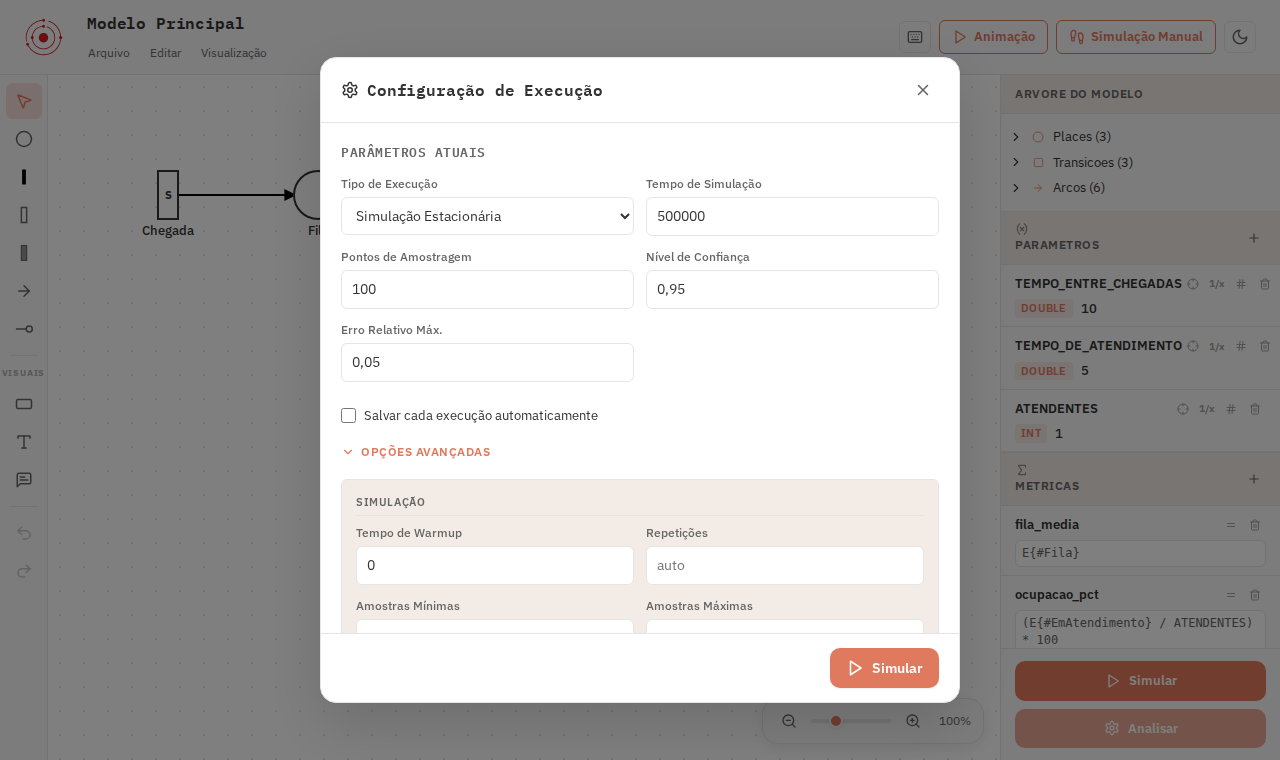
Primary Parameters
Execution Type
The fundamental methodological choice:
- Stationary Simulation: Measures long-term equilibrium averages.
- Transient Simulation: Measures the time-dependent state evolution $f(t)$.
A deep comparative guide is provided in Stationary and Transient.
Simulation Time
The total simulated horizon, expressed in the model's global time unit:
- If your unit is minutes, entering
500000simulates 500,000 virtual minutes of operation. - Thanks to Jupiter's Rust engine, hundreds of thousands of events simulate in seconds.
Sizing the Simulation Time
Choose a horizon that guarantees tens of thousands of completions. For a task taking 5 minutes, a simulation time of 100000 generates approximately 20,000 completions — typically ample for tight statistical confidence intervals.
Advanced Options
Expanding Advanced Options provides fine-grained statistical controls:
1. Warm-up Period
Simulations start with an empty system. This initial filling phase skews long-term averages if not discarded.
- The warm-up period discards initial state events before calculating cumulative statistics.
- A typical warm-up of 5% to 10% of the total simulation horizon eliminates cold-start bias.
2. Confidence Level and Max Relative Error
The engine runs independent replications and estimates confidence intervals using the batch means method:
- Confidence Level: Standardly set to 95%. This means the true theoretical expected value lies within the estimated margin in 95 out of 100 runs.
- Max Relative Error: Sets the stopping threshold for acceptable error margins (e.g.,
0.05for 5%). Stricter thresholds trigger additional replications.
3. Random Seed
Stochastic models rely on pseudo-random number generators:
- Fixed Seed: Guarantees strict scientific reproducibility. Every run with the same seed yields identical outputs down to the last decimal digit.
- Random Seed: Useful for validating result stability across independent random trajectories.
4. Maximum Event Limit (Max Events)
A safety guard preventing runaways in models with high-frequency loops:
- If an execution aborts with
MAX_EVENTS_REACHED, reduce the simulation time or raise the limit in Advanced Options.
Multiplicative Cost in Scenario Studies
In scenario sweeps, the configured simulation time runs for every single evaluated point. Twenty points with high horizons take twenty times as long. Always calibrate your run time on a single execution before launching large sweeps.
Next steps
Understand the theoretical and practical differences between both modes in Stationary and Transient.